A Shared Home Wi-Fi Setup That Is Easier to Manage
Compare a simple shared note, a password manager and router-based guest access to find a home Wi-Fi system everyone can use and maintain.
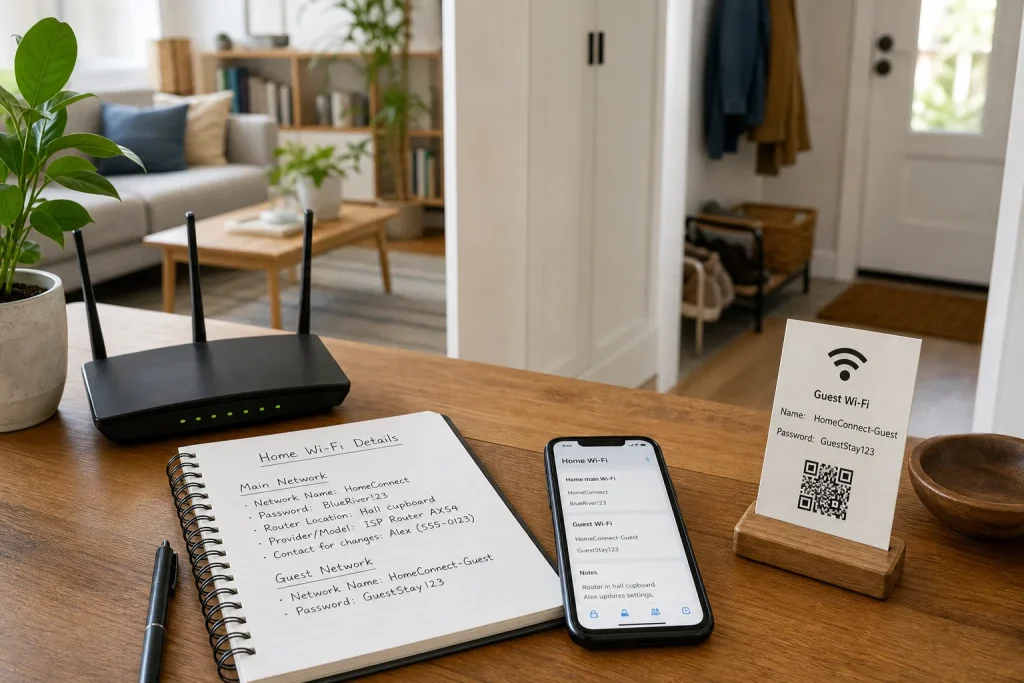
Compare a simple shared note, a password manager and router-based guest access to find a home Wi-Fi system everyone can use and maintain.
Home Life · 7 min read
When a guest asks for the Wi-Fi password, can someone in your household find the right details without turning the router upside down or guessing between three network names? A manageable setup gives people a clear place to find the information, a sensible way to share access and a small record of what is connected.
A shared household note is easy to start, a password manager offers more control, and a router’s guest network can provide separate connection details. Whether a guest network also separates visitors’ devices from your household devices depends on the router and its settings. Check the manual or the router’s settings before relying on that behaviour. You do not need every option; choose what your household can maintain.
One clear network name
Start with the name people should use. If your router broadcasts several networks, check its instructions before deciding whether to keep them distinct. Some routers offer a single name for household devices; others or certain devices may call for separate options. Avoid changing settings just to make the list look neater if you are unsure what the router requires.
Give the main network a recognisable, neutral name. A household name or an easy-to-remember phrase is more useful than a joke that reveals your surname, flat number or other personal details. Keep a note of any separate network names and what they are for, rather than expecting everyone to remember the distinction.
Next, decide where the details belong. A card in a kitchen drawer is convenient for household members who do not use the same apps, but anyone who can reach it can read the password. A digital record is easier to update and share selectively, though people need access to the account or device holding it. Pick a location the people who need it can reach, and tell them where it is.
Write down the network name exactly as it appears, including capital letters and punctuation. That small check can save a round of guessing later.
A shared household note
A note in a shared, access-controlled app is the lightest option. It suits a household where a few trusted people need the details and someone is willing to update them when the router settings change. Use a note app already shared among household members rather than creating another account nobody checks.
Keep the note compact and specific. Include the main network name, its password, the router’s location, the provider or router model if it helps with support, and the name of the person who can change settings. If there is a guest network, record its separate name and password too. Avoid adding account recovery answers, billing information or other details that do not help someone connect.
A shared note can spread further than intended. Check who can open it, especially if the app also shares family calendars, photos or other information. Do not post the password in a group chat that includes temporary visitors, or leave an unlocked screen displaying it in a shared room.
Say a household’s router password changes after a service visit. One resident updates the shared note and tells the others where to find it. The next person checks that note instead of trying an old message, so there is one obvious place to correct if a connection fails.
Choose a shared note if convenience matters most and everyone who can see it is trusted with the network password.
A password manager
A password manager is a better fit when household members already use one, or when you want to share sensitive details only with particular people. Save the Wi-Fi name and password as a secure note, or use a dedicated Wi-Fi entry if the manager offers one. Give it a clear title, such as “Home main Wi-Fi”, so it does not get confused with a guest network or an old router.
Some managers let you share an item with selected people; others organise access through a family or household collection. Check how sharing works before relying on it. Everyone who needs the details must be able to open the manager, and they need a workable way to sign in if their phone is unavailable. Keep account recovery information separate and follow the manager’s guidance for securing the account.
This approach suits households with several regular users, shared devices or a preference for keeping passwords out of plain notes. It is less helpful if one person is the only manager and others cannot get into the account. Agree on who updates the entry and how to contact that person if access breaks.
Store useful network details alongside the password, but do not turn the entry into a complete inventory of private household information. A brief note that the router is in the hall cupboard is enough; unrelated account credentials are not.
Guest network access
A guest network can give visitors a separate network name and password, but its isolation from household devices is not automatic across all routers. Router models and settings differ: some offer controls to limit access to local devices, while others may behave differently. Check the manual and the actual settings, and do not assume that the word “guest” means visitors are blocked from every device or service on your home network.
If the router offers options such as “allow access to local network” or “isolate guests”, read the accompanying explanation before changing them. If the setting is unclear, contact the router provider or a qualified technician rather than guessing—particularly if you rely on work equipment, printers or security devices. A guest network can reduce the need to share your main password, but it is not a substitute for understanding the router’s controls.
Keep guest details separate from the main password. You might put them on a small card near the entrance or save them in the household note or password manager under a distinct title. If the router offers a guest-network QR code, consider placing it somewhere visitors can see without revealing the main network credentials.
Imagine a household whose router manual says its guest network blocks access to local devices only when a particular isolation setting is enabled. A resident checks the manual, opens the router settings, confirms that option is on, and shares only the guest password. The expected result is that visitors use the separate connection details and, according to that router’s documented setting, cannot reach the household’s local devices; if the option is missing or unclear, the resident does not rely on isolation and asks the provider for guidance.
When guest access is no longer needed, you can switch it off or change its password according to the router’s instructions. For occasional visitors, a clearly stored guest password may be enough, provided you do not assume it provides device separation.
A small device record
A short device list helps someone spot what is connected without trying to catalogue every gadget. Record devices that matter for troubleshooting: for example, a work laptop, printer, television, smart speaker or home security hub. Use ordinary names people recognise, such as “Study laptop” or “Living-room printer”, rather than a technical address that means nothing to the household.
Keep the list in the same place as the network details, but separate it from the password if that makes access easier to manage. Useful fields include the device name, its room or owner, and a note about whether it uses the main or guest network. Add the router’s support contact or instructions only if they are genuinely useful.
Do not worry about making a perfect inventory. Add a device when it causes a connection problem or when someone needs to know which network it uses. Remove entries when a device leaves the household. This keeps the record useful without turning routine home Wi-Fi into an admin project.
Choosing your setup
Choose the shared note if the household is small, the people sharing it are trusted, and you want a quick place for the basics. Choose a password manager if access should be more selective or your household already relies on one. Consider guest access when visitors need regular Wi-Fi or you want their credentials distinct from the main network; verify the router’s isolation behaviour separately if device separation matters.
You can combine these options, but give each one a clear job: the manager holds private credentials, guest access gives visitors separate connection details, and a device list helps with everyday troubleshooting. Avoid copying the main password into several places unless each copy has someone responsible for updating it.
Before changing anything, agree on one person to maintain the record and show the others how to find it. Then check the network name and password against the router, confirm who can access the saved details, and read the router’s documentation for any guest-network controls you plan to rely on. A modest system everyone understands is easier to maintain than a clever one only one person can manage.
Keep exploring
A Low-Fuss Method for Keeping Software Up to Date
Keep software updates manageable by checking each app’s update source, choosing a suitable restart time and…
Review App Permissions Without Losing Useful Features
A cautious permission review can protect personal information without breaking the features you rely on. Check…