A Simple Way to Sort Files You Need to Find Again
Choose a folder routine that fits how you work, then use a few clear naming habits to make everyday documents easier to retrieve.
Choose a folder routine that fits how you work, then use a few clear naming habits to make everyday documents easier to retrieve.
Work · 5 min read
Where should you save the document you know you’ll need again: in a folder for the project, by the kind of file, or wherever you can find it quickly? The best answer depends on how you look for things. A useful filing routine is small enough to keep using and clear enough that someone else—or you on a tired afternoon—can follow it.
Start with your search habit
Think about the last file you had to retrieve. Did you remember what it was about, who sent it, or which job it belonged to? That clue points to the folder structure that will suit you best. You do not need to sort every document by every possible detail.
If you mostly work on one ongoing project at a time, organise by project. If you handle similar documents for several clients or departments, organise by work area or client. If your files are mostly personal records, organise by life area, such as household, health or travel. Choose the first detail you are likely to remember when searching.
Keep the top level short. A few broad folders are easier to scan than a long menu of finely divided categories. If you hesitate between two destinations, ask which one you would check first when trying to find the file later.
Choose a folder shape
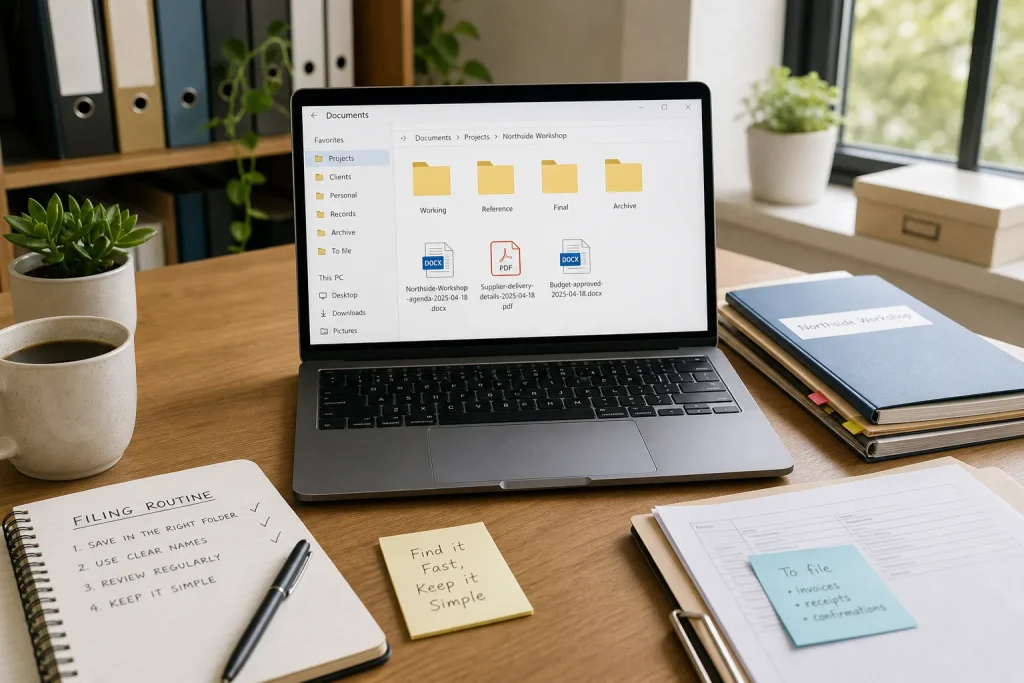
One main project: Make one folder for the project, with a small number of subfolders such as “Working”, “Reference” and “Final”. This fits a report, event or course where documents belong together. Avoid making a subfolder for each tiny task; that can turn saving into a decision of its own.
Several recurring clients or teams: Make a folder for each client or team, then use the same short set of subfolders inside each one. For example, each might have “Agreements”, “Current work” and “Completed”. The repeated pattern means you do not have to learn a new layout for every account.
Mostly personal paperwork: Use plain-life categories such as “Home”, “Health”, “Travel” and “Finances”. Keep sensitive material in an appropriate, access-controlled location rather than treating a folder name as protection. If you are unsure how to store a record safely, check the guidance for the service or device you use.
A mixed pile of one-off documents: Start with a broad “Records” folder and a small number of categories you genuinely use. If a folder stays empty or is hard to distinguish from another, remove it. A simple structure is easier to maintain than an ideal structure that demands constant sorting.
Name files for retrieval
A folder tells you the broad context; a filename should tell you what the file is without opening it. Use a few useful clues, such as the subject, person or project, and document type. For a date-sensitive item, put the date near the beginning in a consistent format, such as “2025-04-18”, so related files sort together by name.
For instance, “Northside-Workshop-agenda-2025-04-18” is more informative than “agenda-final”. If you revise it, use a clear version cue such as “draft” or “approved” rather than adding a chain of “final-final” labels. When a document is no longer current, move it to an archive folder or mark its status plainly; do not leave several files that all appear to be the latest copy.
Use separators consistently, whether you prefer spaces, hyphens or underscores. Avoid names that depend on symbols or shorthand you will not remember. Keep names readable on the screen and include only details that help distinguish one file from another.
Match the routine to your day
If you save files as you work, use the project or category folder immediately. If you tend to download first and sort later, create one temporary “To file” folder and review it as part of a routine you already have, such as closing your work for the week. The temporary folder is a landing place, not a second permanent filing system.
Say you receive a supplier’s revised delivery document while preparing an event. You save it in the event’s “Reference” folder as “Supplier-delivery-details-2025-04-18”, then move the superseded copy into “Archive” or remove it if you no longer need it. Later, searching for the event or supplier gives you a clear route to the current document.
If you collaborate with other people, agree on the few folder names and filename cues they need to recognise. Keep the shared structure understandable to a new colleague, and check that the storage location has the right access settings for the documents it contains.
Keep filing lightweight
Give the system a quick review when a project ends or a recurring folder starts to feel crowded. Move completed work out of active folders, remove obvious duplicates when you are sure they are not needed, and rename files whose titles reveal nothing. Do not reorganise everything just because a new tool or naming fashion appears.
Search is useful, but it works best when names contain words you would actually type. Keep the original document format where it matters, and use a readable filename alongside it. For files shared across devices, use the same folder and naming routine wherever your service allows, so a document does not acquire several competing homes.
Choose one structure you can explain in a sentence, then use it for new files before sorting old ones. A reliable small habit will make the next search easier without turning your folders into another project.
Keep exploring
A Low-Fuss Method for Keeping Software Up to Date
Keep software updates manageable by checking each app’s update source, choosing a suitable restart time and…
A Shared Home Wi-Fi Setup That Is Easier to Manage
Compare a simple shared note, a password manager and router-based guest access to find a home…